I like it. I think studying yours @ivanjones and @RTCool suggestions will be very helpful.
Nice. Thanks.
Also
I felt like I had to turn of Curics extensions as it was not playing nice with Skalp. Do you use with Skalp?
Well updating a Scene that a Viewport is based on, and then wondering why the Viewport changed might not be very smart.
Yes very helpful.
This is what I was trying to do. You and @RTCool have given me much to think and experiment with. Thank you.
I agree!
However, I am the manufacturer of the walls, and the plumbing system, and that level of detail is demanded otherwise my crew gets really really creative. LOL
What makes this even more challenging is that our base building system is a moment frame. So the walls get anchored to the floor, but float at the ceiling.
Thanks for your comment.
- After cooling down.
- Taking a walk.
- Venting to the forum
- I Rebooted and opened only SU and LO
- LO returned to working the way I expect. Meaning the viewport stopped jumping around. I still have the ghost Guide not coming though. ( I think rethinking of how I use guides from multiple suggestions will be the resolution )
Thank you so much all of the users that chimed in. I feel like I have some homework to do to study the beautiful workflows offered up.
Much gratitude to you all.

Im not clear when you talk about your “Guides”. If they are SketchUp guides I wouldn’t do that. Maybe make a 2d square or a short line in SketchUp to represent the component as a proxy that you tag in SketchUp and can turn on in Layout so you can dimension to it. This way you can have all those complex components turned off. Here is the same example Ive show with my “Guides” turned on.

These guides are lines or rectangles drawn in Layout. They are preformatted in my scrap book so I drop them in and assign them to the guides layer. This geometry can also snap nicely to the vector geometry. It lets me quickly align my grid markers so the grid line and the dimension extension line are in the same spot. Also allows placement of the grid marker at the intersection of two guides. I usually turn off these Layout Guides when dimensioning as they are above the geometry and the dimension wants to snap to it instead of the geometry Im dimensioning.
I always have a separate site model where the focus is on the external surveys of site data and terrain. I often have a stripped down model of the building places in the site model eliminating a lot of complex components and such that dont show up anyway. You dont have to have ecerything in one model. Perhaps those complex components are in a separate SKP file. I do that and then make them into a Scrapbook detain in Layout.
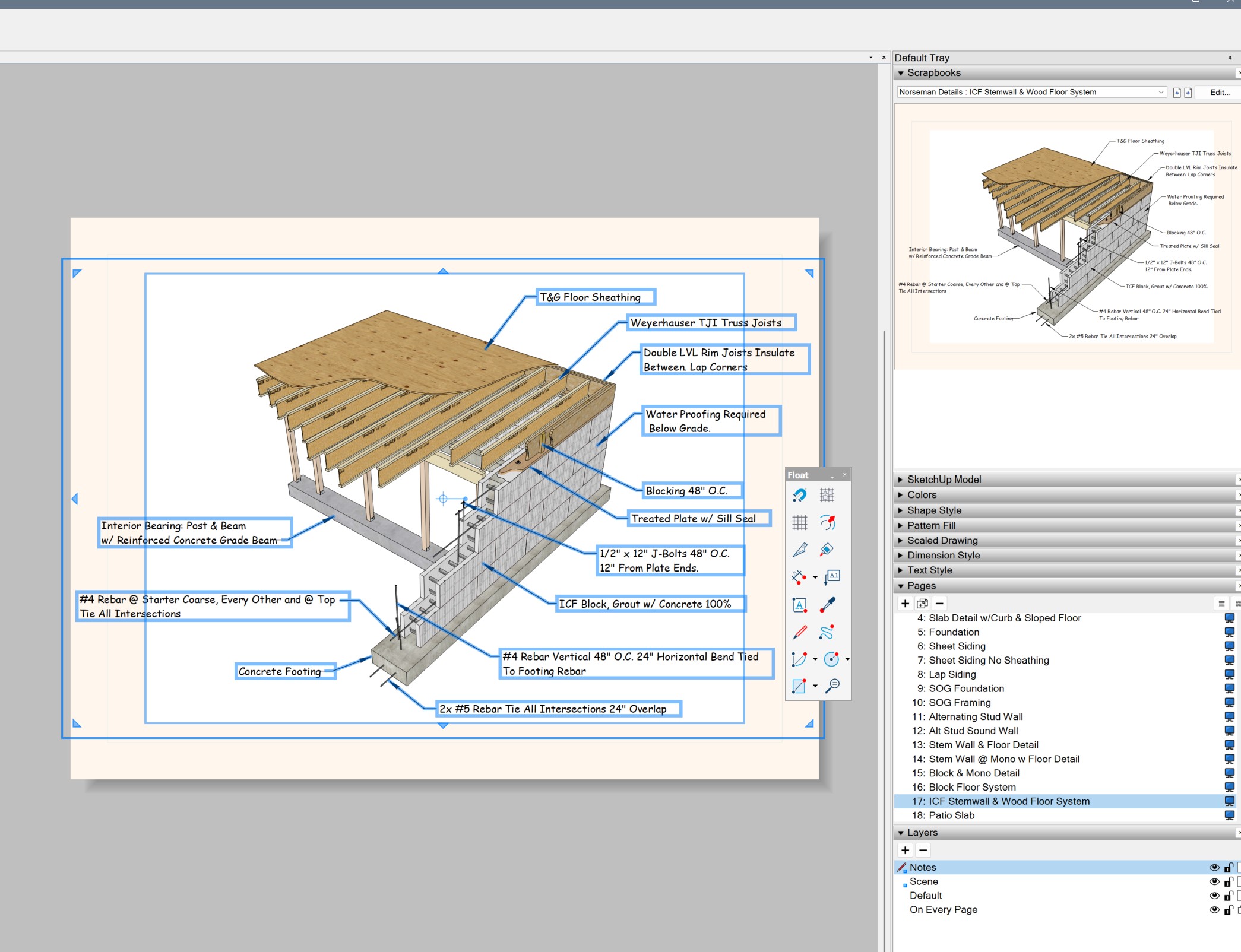
Just so you know I used to cuss Layout a lot until I decided to figure out how “we can all just get along”
1 Like
I do not use Skalp…
Starting from a rant that ended up a very informative thread. I learned a LOT.
Well done to both the OP for taking it all on board and to the contributors for sharing so much of their workflow.
3 Likes
Yup. Layout sux. Many, including myself, have asked for it to be fixed for many years and it still sux.
LayOut will automatically update when you open a SketchUp file from within LayOut (context click “Open with SketchUp”), make changes to your SU model, Save and navigate back to LO. When you open your SketchUp model and LayOut file separately (say from the icons) you will need to direct LayOut to “Update Model Reference” for the changes to take effect.
That explains a lot about why sometimes it works and sometimes it does not. That is a huge GROK!
I feel the same!
Cunningham’s Law states “the best way to get the right answer on the internet is not to ask a question; it’s to post the wrong answer.”
5 Likes
Layout wasn’t a bad application at first.
But I’ve noticed (on recent versions I’ve tested) that I can no longer trust this solution, which lacks reliability and can be dangerously insecure. For example, the 2018 version is very good, except that it can be very slow on a current computer or system with normal display settings… which isn’t the case with the 2020 version, which is fast! Forget the 2019 version, which has very bad memories of bugs in the handling of .skp insertions… Some recent version failed on PDF export, LO2018 or LO2020 don’t fail !
Officially, we’re told that versions of SketchUp/Layout that are more than a year old don’t work well on recent systems. As a precaution, I stayed on an older version for a long time, on a somewhat older system. Recently, I bought a new computer and tested it… and as a result, I updated all the operating systems! And it works pretty well. The reality is that each version has specific bugs and no version is ideal. I plan to use Layout for about another last year.
I’ve been using PRO since 2020. I’ve done countless projects, including entire houses, custom framing, drawings of building permits, decks, to mention some of them. I have no use for Layout, and everything I’ve done is fully dimensioned and professional. I wish someone could explain to me why on earth I need Layout. It would be really nice if the SketchUp team would bring some of the really useful tools from Layout into PRO, such as dimensioning angles, including tables, a good text tool, etc.. I started with AutoCAD back in 89, and could do everything needed then, and I can do everything needed now with PRO. I think it would make sense to take all the energy SketchUp puts into Layout, and refocus it on PRO.
Maybe you just answered your own question..
When you get a chance, it would be good to update your profile info. That way, if you post a non-rant question in the future, the good people of the forum can give you support more effectively.
Perhaps you don’t need Layout. If you have been able to accomplish everything you need I assume by exporting 2D images from Sketchup then that works for you. For construction documents like I and others need to regularly produce in all kinds of industries it just wont do. I need to make documents that have multiple pages, with all kinds of different information in text and images, I need multiple views of the same object per page and many different ways of looking at the construction, including different perspectives, sections, and details. Then once the document is “done”, i need to make revisions to the design and have the whole document updated to include the new revisions across every page and every viewport. This would take me forever without the SketchUp Layout linked combination of programs. If you accomplished all your work with single images without annotation or other document information then cool, well done you. But the images you are outputting must necessarily be rudimentary and simple and would not meet the expectations of my clients and workflow. Layout is pretty sweet, give it a chance and you might be able to really elevate the quality level, beauty, usefulness and professionalism of your 2D documents.
How so?