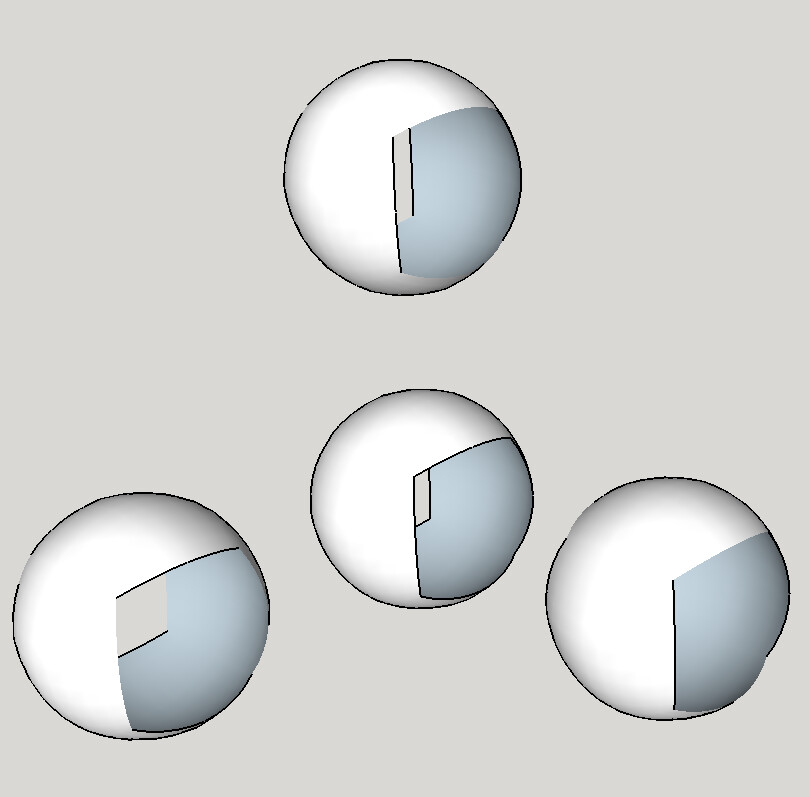
Those faint ridges were keeping me from obtaining the solid shapes depicted in front of the dark sphere.
Since their contours aren’t straight edges, some of them straddle the limits of the quadrants they occupy.
If you’ll notice, the horizontal equivalents to the extant ridges are absent, so that one can travel around the blue equator without crossing any of the said ridges.
Hoping to get rid of the offending feature, I’ve tried numerous methods of substitution that have all failed.
The “clean” belt at the center of the second .png loses either sets of edges when copy-moved in any of the three axis, but the ruse falls short upon reassemby without the offending features.
Furthermore, a simple copy-rotate creates double-surface sectors as shown here, where the lower-right third’s surface is clean, whereas as the others are superposed without coinciding.
That should take care of my original problem, if and when I reactivate my Vertex tools (expired trial).
But it still leaves out my main question, which was the one about symmetry, or lack thereof.
I’m aware of that, but my question still remains.
SU’s traditional tools are not up to that job? Why?
I don’t have access to Vertex tools or SubD, having elapsed trial runs for both and not succeeding in buying them now.
And anyways, I’d like to understand how the native tools, even when used carefully, fail to produce clean results; Those operations all seem straightforward enough…
How did you create the original, and can you be sure it is symmetrical in itself?
And a related note, make sure your ‘bumps’ are not the result of hiding the edges rather than soften/smooth.
These are identical, but the one on the left I used shift with the eraser and on the right ctrl with eraser.
Retrace one of these with arc tool set at, in this case, 5 segments, making sure to infer to an adequate apex.
Delete original short arcs, alt-rotate the new arc to close the figure.
Select the 2 remaining arcs and the 2 new ones.
Curviloft and serve at room temperature.
That’s why I asked how you made it, because the earlier model was just ever so slightly out of alignment and you have to be very careful just setting it up to get the shape to begin with.
Looks like you got it right this time.
I also was curious how you made that specific shape without a plugin, ah yes, curviloft, that’s not a plugin.
I have nothing against plugins, I’d die without Paste-In-Place and Perpendicular, to name just those two. It’s just that I have expired trials of both SubD and Vertex Tools, which ask for “keys” when I run them. I don’t “get” the whole quad concept, and so figured I’d let the extensions lapse since I didn’t understand their basics. Going through Extension Warehouse, the only option is the “Install” button, with no “pay” option. Clicking install does nothing. Should I get rid of the trials downloads that’re already installed?
I’m running Make '17 on MacOS10.10, which probably limits the Plugin versions my system can use.
My takeaway from this is that I shouldn’t be so quick to question the software’s integrity, and to look for flaws in my constructing instead. The only step I took in my “demo” which was new was erasing the faulty arcs that remained behind after I’d moved their newly-made group…
That might have been the issue, I was finding strange double edges at those ridges in your earlier model. So you may have somehow left them or hidden them and exploded on top of them. Who knows.
Love plugins, but always like to know how to do things manually too.
If you want to buy SUbD and Vertex tools there is usually an option on their menu to go to license and it should lead you from there. I think from memory, Extensions/SUbD/License/Help should take you there.
Or uninstall them if you nolonger want them.
Now that the dust has settled, things are coming into focus.
The real take-away from all this is to start looking into the consequences of grouping some of the elements that define entities not being included in that group.
Should make for a lot fewer bumps in the road…